
Stake Login and Sign Up Guide for Pakistan
One account on Stake gives access to the casino, the sportsbook and a wallet that accepts Pakistani Rupees and crypto. Registration takes about a minute and needs only an e-mail, a username and a password; logging in later works with a password, Google or a passkey.
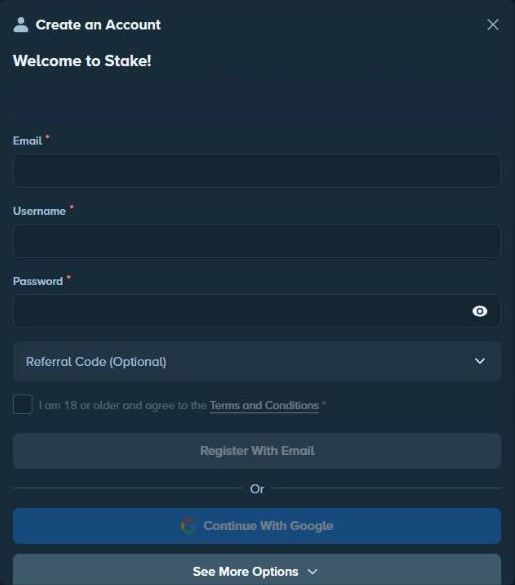
How to Register on Stake
Tap Register
The blue button sits at the top of every page and in the mobile app.
Enter your e-mail
Use an address you can always reach — it receives verification codes, password resets and bonus e-mails.
Choose a username
It appears in chat, on race leaderboards and in the list of recent bets, so avoid your real name.
Create a password
The eye icon shows what you typed; a password manager can generate a strong one.
Add a referral code
Open “Referral Code (Optional)” and type the code. It activates the 3.5% rakeback welcome offer.
Confirm and register
Tick “I am 18 or older and agree to the Terms and Conditions” and press Register With Email.
The Stake sign up form is short on purpose: personal details come later, during verification. A few rules are worth knowing before you start. Only one account per person is allowed, and alternative accounts are forbidden in chat and in promotions. A referral code entered in the form overrides any affiliate link you clicked earlier, and if you forget it, there is a 24-hour window to add it under Settings → Offers.
Verify Your E-mail Address
Right after registration, select Verify Account, open Confirm Your Email and enter the code from the e-mail. If you skip it, go to Settings → Account → Email later and press Confirm Email; the same window lets you correct a mistyped address and resend the code. A verified e-mail is required for deposits, withdrawals, the monthly bonus and password resets, so it is the first thing to finish. The next step is identity verification: Level 1 adds your name, date of birth, address and country, and PKR withdrawals need Level 2 with an identity document.
Stake Login: How to Sign In
Press Sign In
The grey button sits next to Register in the header.
Enter e-mail or username
Both work in the same field.
Type your password
Or choose Continue With Google or Continue With Passkey.
Enter the 2FA code if asked
Codes from the authenticator app are valid for 30 seconds.
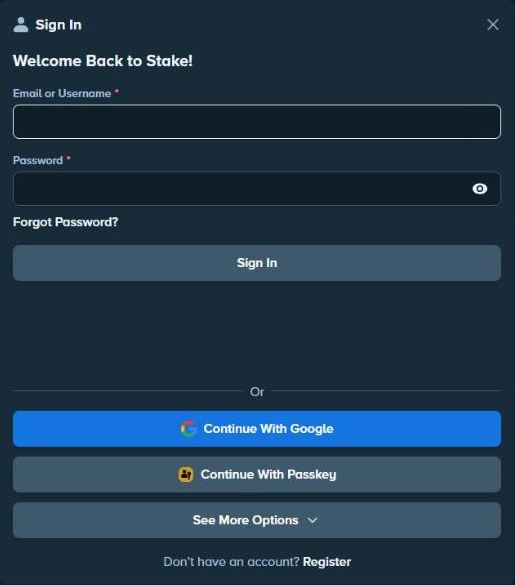
Stake Pakistan login works the same on desktop, in the mobile browser and in the home-screen app you get after you download Stake, and the session stays active until you log out or clear cookies. Always type stake.com yourself or use your saved icon; search ads and links in messages can lead to look-alike pages that copy the Sign In window to steal passwords.
Passkeys and Two-Factor Authentication
A passkey replaces the password with your device's fingerprint, face recognition or PIN. Stake supports passkeys built on the FIDO standard used by Apple, Google and Microsoft; they cannot be guessed, are useless in data leaks and only work on the real site, which makes them the strongest protection against phishing. To add one, sign in, open Settings → Security and choose Add Passkey.
Two-factor authentication (2FA) protects logins, withdrawals and tips. Install an authenticator app, open Settings → Security, scan the QR code or copy the string, enter the 30-second code and confirm with the link Stake sends by e-mail. Never share the QR code or string with anyone, including people who claim to be support staff.
Forgot Password and Account Recovery
Forgot Password under the Sign In form sends a recovery link to your verified e-mail within minutes; follow it and set a new password. If the e-mail never arrives, check the spam folder and make sure the address on the account was verified. When the e-mail account itself is lost, write to recovery@stake.com from the new address you want to link, and the team will guide you through ownership checks. Lost access to 2FA is handled the same way: send a message to recovery@stake.com from the account's e-mail, provide the requested account details, and access is restored within 48 hours after a successful review. For other questions the 24/7 live chat is the fastest route.
Login Problems and Fixes
| Problem | What to do |
|---|---|
| “Wrong password” after a social sign-up | Use the same Google or other button you registered with |
| Verification e-mail not received | Check spam, then resend the code from Settings → Account → Email |
| 2FA code rejected | Sync the phone's clock and use the newest code |
| Logged out on every visit | Allow cookies, leave private browsing, clear cache |
| Account closed or excluded | Self-exclusion and closure block logins by design |
Clearing cache and cookies solves most loading loops: in Chrome on Android go to Settings → Privacy → Clear browsing data, in Safari on iPhone go to Settings → Safari → Advanced → Website Data. If an account was closed or excluded on purpose, logging in stays blocked until the chosen period ends or a return-to-play review is approved.
Tips for a Safe Stake Account
- One account only: duplicate accounts are against the Terms and can lose their balances.
- Real details: the name and country must match your documents, otherwise withdrawals stall at verification.
- Matching phone number: for PKR payments the number on the account must be the one linked to your mobile wallet.
- No VPN: hiding your location breaks clause 14.4 of the Terms and can lead to closure.
- Official e-mails only: Stake writes from noreply@stake.com, noreply@mail.stake.com and support@stake.com.
Once the account is ready, the first deposit can be made in PKR from 500 rupees or in crypto, and every deposit has to be wagered once before it can be withdrawn.
Login and registration FAQ
How do I create a Stake account?
Tap Register, enter an e-mail address, username and password, optionally a referral code, tick the 18+ box and press Register With Email. Then confirm your e-mail with the code that arrives in your inbox.
Can I add a referral code after registering?
Yes, within 24 hours. Open Settings → Offers and enter the code there. After 24 hours the field is no longer available.
I forgot my password — what now?
Use Forgot Password in the Sign In window and enter your verified e-mail. A reset link arrives within minutes. If you signed up with Google or another social account, reset the password with that provider.
What if I lost access to my e-mail or 2FA?
Write to recovery@stake.com. For lost 2FA, send the message from the e-mail linked to the account; access is usually restored within 48 hours after ownership is confirmed.
Can I have two accounts?
No. Alternative accounts are forbidden, and duplicate accounts can be closed together with their balances and bonuses.
Sign Up with Google and Other Accounts
Below the e-mail form, Continue With Google creates an account in one step, and See More Options lists further sign-in providers; the Stake home page shows Google, Facebook and Kick buttons. Social sign-up is quick, but it changes two things. First, your password lives with that provider, so a Stake password reset does not apply — you reset it on Google or Facebook. Second, before every withdrawal Stake asks you to re-verify with the same provider (OAuth verification), which means you need access to that social account whenever you cash out. Players who share a phone or a Google account with family usually find a separate e-mail registration more practical.